Open a dataset project
Always open a dataset project from an ANC template
Any dataset repository on the ANC should be opened from an ANC project template, regardless of whether you are uploading an existing BIDS dataset, or are acquiring data with one of ANC's automatic conversion pipelines. The template contains basic files that are required for any valid BIDS dataset as well as files that take care of essential ANC operations, such as BIDS validation and the generation of a dataset specific website. Additionally, the template comes with predefined "issues" or to-do's that help you prepare your dataset.
Open a dataset project from the correct template. All datasets containing MEG, EEG, MRI, or task behavioral data, should be opened from the bids-basic template. If your dataset only contains questionnaire data (phenotypic data in BIDS), use the BIDS Phenotypic-only template.
To open a dataset project you require an ANC account and you should be assigned to at least one working group, where you will create the dataset project.
Optional reading — How ANC organises datasets
ANC stores datasets as GitLab projects organized in groups.
Dataset projects and groups
ANC focuses solely on datasets in BIDS format. Each BIDS dataset is stored in one GitLab dataset project in a research unit group, which is a direct subgroup of the BIDS Datasets group.
In general, one dataset project should correspond to a single study. Deviations from this rule — for example, splitting acquired data types across multiple projects — should be discussed on a case-by-case basis and documented.
User permissions and roles
GitLab implements a fine-grained user permission scheme. Users are added to groups and projects as members with specific roles. The roles limit what actions a user can take.
Project visibility
By default, each dataset project is private. This means that only users who were explicitly added as members of the project can view it and contribute to it. The goal of the ANC is to increase the number of publicly available datasets, which however requires further legal investigation.
- Navigate to your working group under BIDS Datasets, and click new project in the top right corner.
- Select Create from template.
- There are three tabs over the listed templates — select Instance to see all ANC templates.
- Now you create your dataset project. Check whether your project is in the correct namespace under Project URL. This should be in
BIDS datasets/<working group label>. For example,bids-datasets/neurocogfor the Neurocognition Lab. - Provide a descriptive name for your dataset.
- Replace the project slug(1) if necessary.
Warning
If you are using any of the ANC automated pipelines for injecting your data, the project slug has to match the project identifier of the dataset that is provided in filenames (see site-specific instructions for more information).
- (Optional) Add a description for your dataset project.
- Set the visibility of your dataset project to Private (See ANC Code of Conduct).
- Click Create project to finish creating your dataset project.
- When you provide the name for your dataset, GitLab automatically fills in your project slug based on the name. You can use any name for your dataset project, we recommend you use a descriptive name and avoid abbreviations. You are free to use capital letters and spaces. However, the project slug will become part of the URL or address to your dataset. It does not need to match the dataset name, it cannot contain spaces and should not contain capital letters.
What's in your new project?
When you open an ANC dataset project it contains several files. Some of these are part of the BIDS dataset and need to be filled in, and other files take care of ANC operations and should be left alone.
File overview
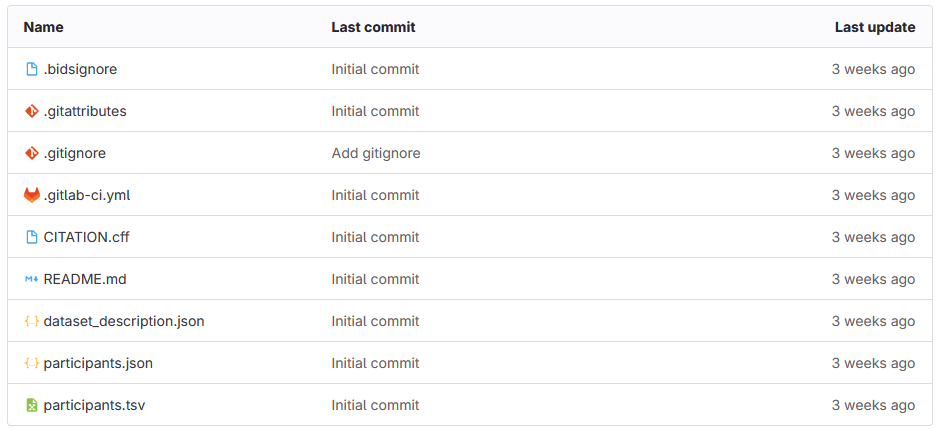
Within a newly created dataset project you can find the following files:
Phenotype only
If you are in a phenotype only project there is also a phenotype directory with template files for your phenotypic data. These are explained further in our formatting guides. Here we only explain the files that are common among all dataset templates.
Note the icons left to the filenames — they indicate the file type. Some files are necessary for ANC operations. You don't need to worry about these files, but we provide a short description for background:
.bidsignore: ensures BIDS validation can go through (artefacts generated during validation should be ignored by the validator).gitattributes: configuration file for git, ensures that large data files are treated appropriately by git version control.gitignore: more configuration for git, ensures your derivatives are not added to the repository.gitlab-ci.yml: GitLab continuous integration file, ensures BIDS validation is run on your data and your dataset website is generated automatically
Other files need to be filled in by you. This can be done using the template issues described below.
CITATION.cff: contains information about how this dataset should be cited; your dataset website is generated based on this fileREADME.md: a general description of your dataset, provided on the dataset websitedataset_description.json: dataset metadata including information about funding and ethical approval; information about BIDS version is maintained by the data stewardsparticipants.json: describes the contents of theparticipants.tsvparticipants.tsv: contains demographic information about study participants
Template issues
Your ANC dataset project comes with a set of template issues. You can find them under Plan > Issues in the left side panel. These issues are to-do's that describe which files need to be updated by you and ensure your dataset contains all necessary information. Some of this information is used by the ANC to generate your dataset website. DOIs provided by the ANC link to this website, which provides an overview of your dataset without giving direct access to the dataset files.
We recommend you start by resolving some of the template issues. A general description of how to resolve an issue (and how to create issues for yourself) can be found under Working with data.
Dataset data steward
Each dataset is assigned to an ANC data steward. You can find them in the issue called Dataset Status. Whoever is assigned to the issue (see Assigned in the right panel) is there to assist you in putting your data on the ANC. You can leave any questions you may have in the Dataset Status issue. You can also mention the data steward in any of the template issues, or issues that you open yourself, in case you have a question or require assistance (type @<data-steward-name> — their username should appear in the drop-down menu).